8. Accelerators
Overview
Welcome to Unit 8 of the HIPC course.
In 2008, Roadrunner became the first supercomputer to surpass the PetaFLOP barrier, marking a milestone in high-performance computing. Roadrunner was one of the earliest modern heterogeneous systems, utilising PowerXCell accelerators to achieve unprecedented performance. Today, many of the world’s largest computing systems are heterogeneous, employing GPUs to accelerate computational workloads. This unit introduces the fundamentals of accelerators and how to program them.
Specifically, in this unit, we will cover:
- Accelerators in HPC
- GPGPU platforms
- GPU architectures
- Programming with CUDA
By the end of this unit, you will have a foundational understanding of GPUs and CUDA basics, and you will be prepared to program GPUs using CUDA.
A Brief Introduction to GPUs in HPC
As the name suggests, an accelerator is a device designed to speed up specific computations in an HPC application. Accelerators act as peripheral processors, capable of performing additional tasks in the background, thereby releasing resources on the main processor.
In the June 2026 TOP500 list, 276 of the 500 systems (55.2%) used accelerators or co-processors, including GPUs (graphics processing units). This is the share of systems, rather than the share of total computing performance. Broadly, accelerators can be classified as (1) general-purpose or (2) domain-specific. Using accelerators often requires the collaborative design of both software and hardware (known as SW & HW co-design). This close coupling between software applications and specific hardware platforms can make porting and maintenance more challenging.
Accelerated computing began gaining popularity with the release of the first Petascale system, Roadrunner, which featured IBM PowerXCell 8i accelerators connected to each core.
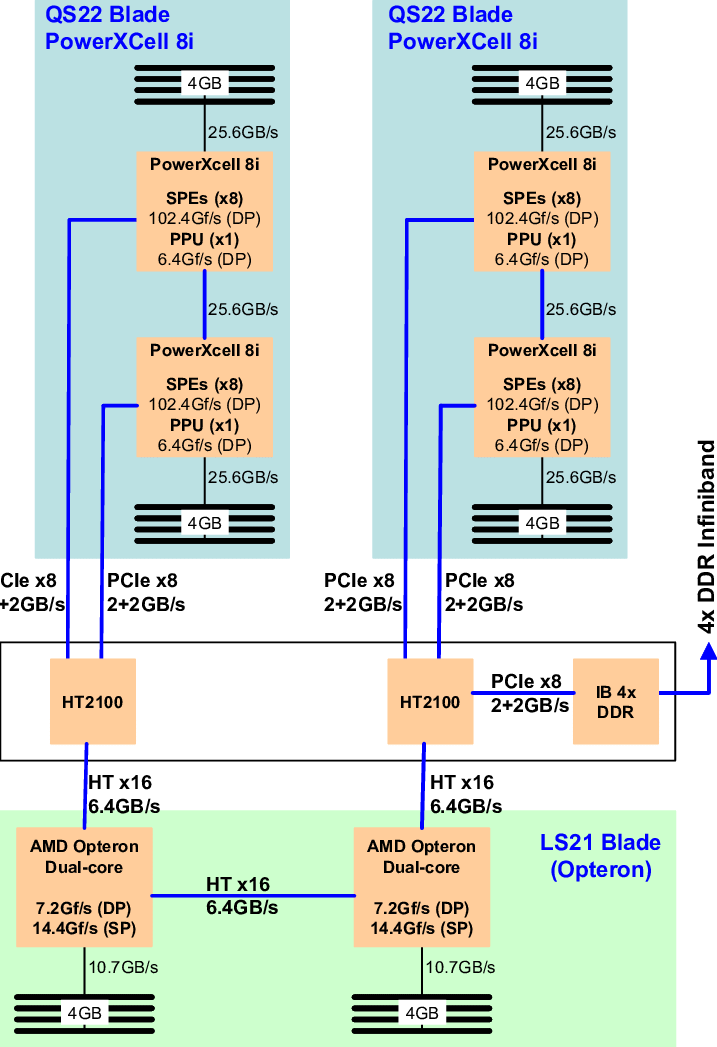
Figure 1: Roadrunner’s architecture
In the following years, the trend shifted rapidly toward the use of GPUs, driven by their versatility and relatively low cost. The widespread adoption of GPUs as accelerators has also helped address programmability challenges, due to their general-purpose design and well-supported programming infrastructure. GPUs used for general computation are often referred to as GPGPUs (General-Purpose Graphics Processing Units).
In 2007, NVIDIA introduced the CUDA development environment, the first widely adopted programming model for GPU computing. Two years later, OpenCL became widely supported, providing a framework for developing code that runs on both GPUs and CPUs, with a strong emphasis on portability. This development helped establish GPUs as a more generalised computing device.
Despite competition from other companies (e.g., AMD and Intel), the combination of NVIDIA GPUs and CUDA continues to dominate several application areas, including scientific computing, deep learning, and animation rendering. NVIDIA GPUs form the backbone of some of the fastest computers in the world.
As mentioned earlier, CUDA is a parallel computing platform and programming model developed by NVIDIA for general-purpose computing on its GPUs. CUDA enables developers to accelerate compute-intensive applications by utilising GPUs for the parallelisable portions of computations. In this unit, we will focus on NVIDIA GPUs and CUDA programming; however, many of the concepts will be applicable to other GPUs and GPU programming models as well.
GPU vs CPU: What’s the difference?
GPUs were initially designed to accelerate 3D graphics rendering. Over the past few decades, researchers have leveraged GPUs to perform complex scientific computations, including fluid dynamics simulations using the Lattice Boltzmann model, cloud dynamics simulations, finite-element analyses, and ice crystal growth modeling, among many others.
A common question is: why use a GPU alongside a CPU? While a CPU is well-suited for general-purpose computing and optimised for serial tasks, a GPU is designed for parallel processing. This makes the GPU exceptionally powerful for executing numerous smaller, simpler tasks simultaneously.
Architecturally, GPUs often contain hundreds of arithmetic logic units (ALUs), whereas CPUs have a limited number of ALUs, typically corresponding to their core count. This architectural difference shapes their distinct approaches to processing tasks and determines their suitability for different types of workloads.
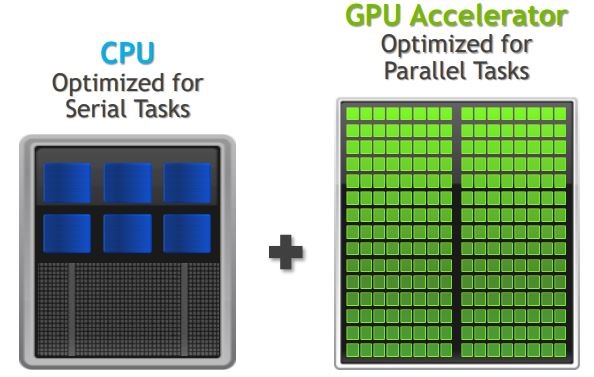
Figure 2: The key differences between CPUs and GPUs
To clarify, the table below outlines the main strengths of CPUs and GPUs:
| CPU strengths | GPU strengths |
| Very large main memory | High bandwidth main memory |
| Very fast clock speeds | Latency tolerant via parallelism |
| Latency optimized via large caches | Significantly more compute resources |
| Small number of threads can run very quickly | High throughput |
| High performance/watt |
The table below provides a comparison of the main weaknesses of CPUs and GPUs:
| CPU weaknesses | GPU weaknesses |
| Relatively low memory bandwidth | Relatively low memory capacity |
| Low performance/watt | Low per-thread performance |
Modern CPUs are optimised for sequential, serial processing with high operational frequencies and benefit from large cache sizes. Their general-purpose architecture makes them suitable for a wide range of tasks. However, CPUs are less effective for highly parallelisable programs. In such cases, GPUs can be 100 times or more faster than CPUs due to their fine-grained parallelism, making GPUs ideal for offloading workloads that are less suited to CPUs.
The following graph provides a direct comparison of their performance, showing the single- and double-precision floating-point performance (left) and memory performance (right) of NVIDIA Tesla GPUs compared to various x86 CPUs:
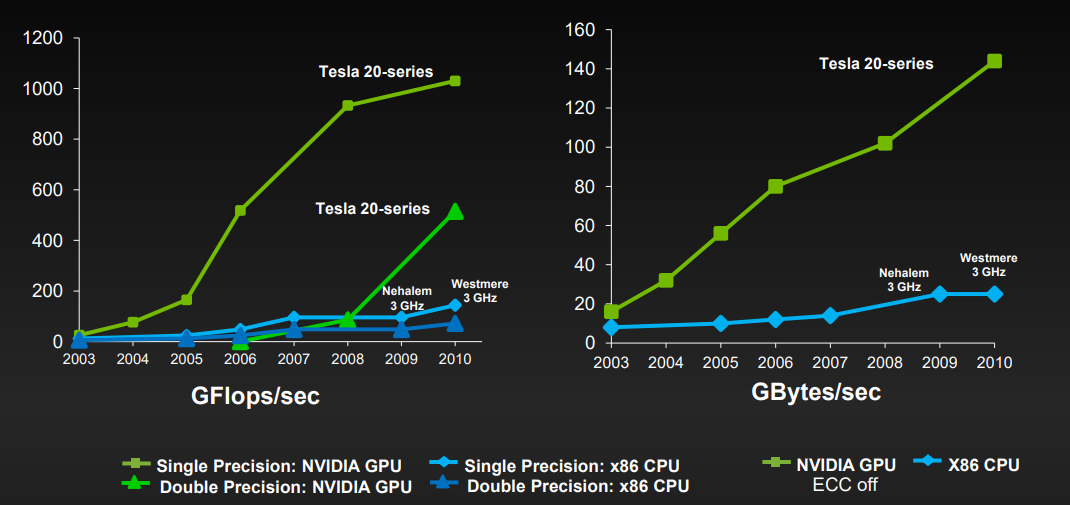
Figure 3: CPU and GPU performance comparison
These differences between a CPU and a GPU were demonstrated in the TV Show Mythbusters (2009).
The Microarchitecture of NVIDIA GPUs
The architecture of NVIDIA GPUs has evolved over several years. Since 2006, NVIDIA has introduced a range of GPU microarchitectures, which are: Tesla (2006), Fermi (2010), Kepler (2012), Maxwell (2014), Pascal (2016), Volta (2017), Turing (2018), Ampere (2020), Hopper (2022), and Blackwell (2024).
An overview of NVIDIA’s GPU architecture is given in Figure 4:
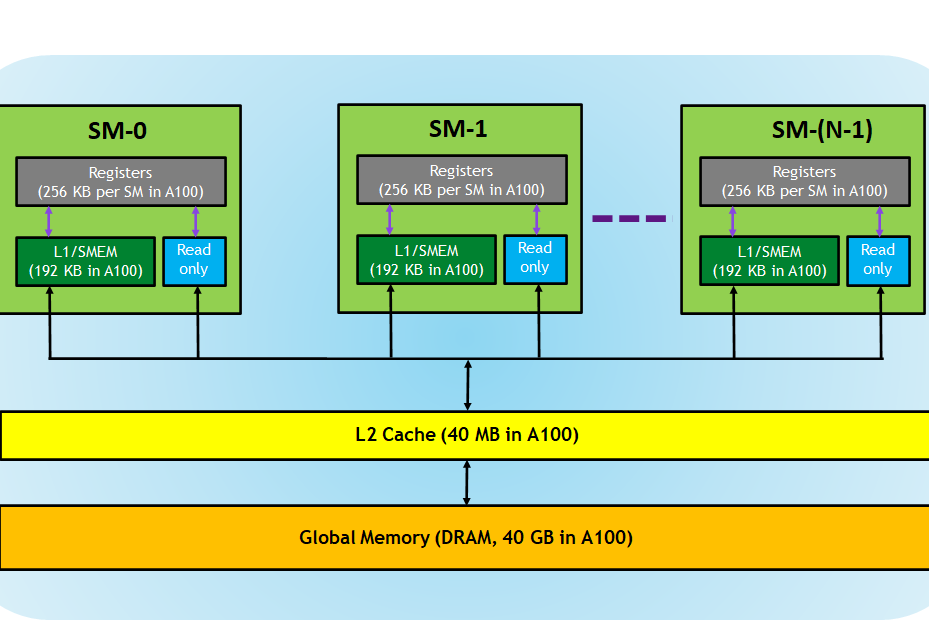
Figure 4: GPU Hardware Model – Overview (A100)
At a high level, a GPU resembles a CPU in terms of memory hierarchy. However, when examining the low-level microarchitecture, significant differences emerge in how GPUs are organised and designed compared to CPUs.
An NVIDIA chip consists of one or more streaming multiprocessors (SMs). Each SM has a dedicated L1 cache, while all SMs share a unified L2 cache. Within each SM, there are 1-4 warp schedulers, each equipped with a register file and multiple execution units. These execution units may be dedicated to a specific warp scheduler or shared among schedulers. The execution units include CUDA cores (FP/INT), special function units (SFU), texture units, and load-store units (LD/ST).
Figure 5 illustrates the internal structure of an SM, using the Pascal computing architecture (e.g., GeForce GTX 1080, Tesla P100) as an example. The diagrammatic structure is shown below.
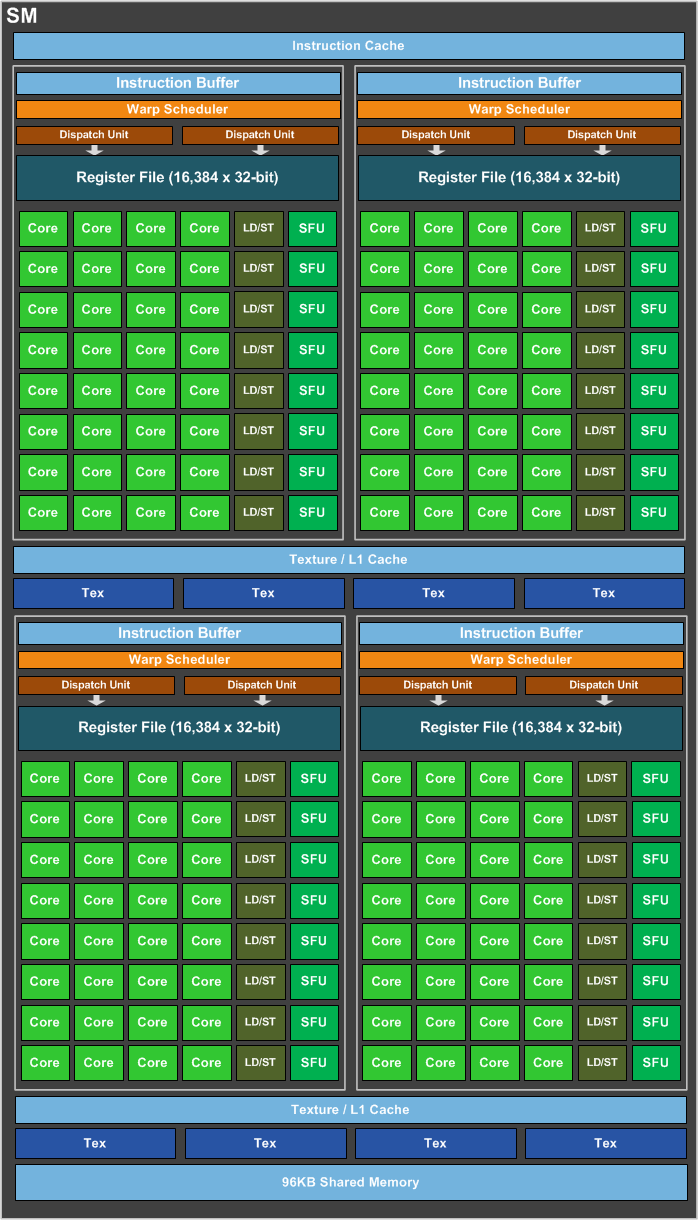
Figure 5: GPU Hardware Model – SM (of a GP104/Pascal)
As shown, the number of CUDA cores within an SM is substantial. In a GeForce GTX 1080, there are 20 streaming multiprocessors (SMs), each containing 128 CUDA processor cores, for a total of 2,560 cores. To efficiently manage and utilise this large number of cores, each SM employs a single-instruction, multiple-thread (SIMT) approach, concurrent threads are created, managed, scheduled, and executed in a group of parallel threads, known as warps.
We will explore these details in the following section.
GPU Programming with CUDA
What is CUDA?
CUDA (Compute Unified Device Architecture) is a parallel computing platform and application programming interface (API) that enables software to leverage certain types of graphics processing units (GPUs) for general-purpose processing – a method known as general-purpose computing on GPUs (GPGPU). CUDA provides a software layer with a C-like programming interface, granting direct access to the GPU’s virtual instruction set and parallel computing elements for executing compute kernels. First released by NVIDIA in 2007, CUDA was designed not for graphics but for parallel computation, allowing GPUs to handle many parallelised floating-point computations.
CUDA Scalable Parallel Architecture
Before diving into the details of CUDA programming, let’s first examine the CUDA programming model:
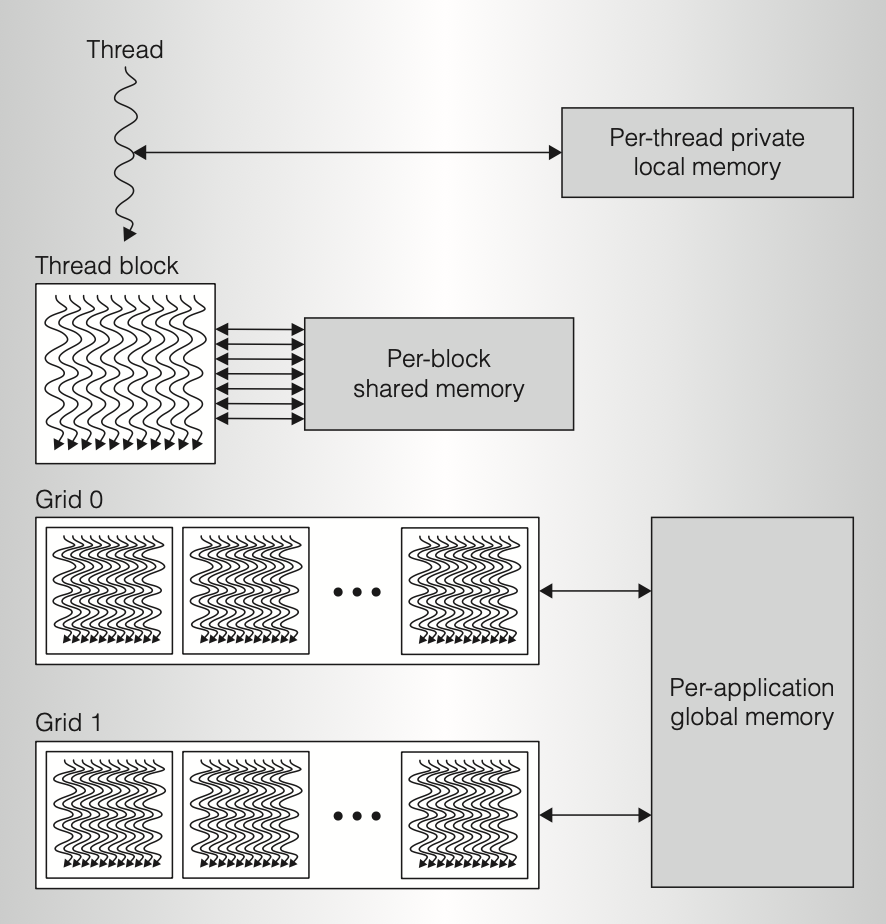
Figure 6: CUDA Parallel Thread Architecture
(1) Thread and Thread Block
A CUDA program consists of a host program, which includes one or more sequential threads running on the host, and one or more parallel kernels (functions that execute on the device) optimised for parallel GPU execution. Within an SM only one kernel runs at a time, and it is executed by a set of lightweight parallel threads. For efficient resource allocation (e.g., minimising redundant computation and reducing shared memory bandwidth), threads are organised into thread blocks. A thread block is a programming abstraction representing a group of threads that can execute either serially or in parallel.
(2) Grid
Multiple thread blocks are grouped together to form a grid. Threads from different blocks within the same grid can coordinate using atomic operations on a globally shared memory space. Sequentially dependent kernel grids can synchronise through global barriers and coordinate via global shared memory. Thread blocks implement coarse-grained, scalable data parallelism and provide task parallelism when executing different kernels, while the lightweight threads within each thread block implement fine-grained data parallelism and offer fine-grained thread-level parallelism when executing different execution paths.
(3) Scheduling of CUDA thread blocks
The global work scheduler distributes CUDA thread blocks to SMs with available capacity, balancing load across the GPU and enabling parallel execution of multiple kernel tasks when appropriate. The multithreaded SMs then schedule and execute these CUDA thread blocks and their individual threads. Each SM can process multiple concurrent threads to hide long-latency loads from DRAM memory. Once a thread block completes its kernel execution, it releases the SM resources, allowing the work scheduler to assign a new thread block to that SM. Each thread block is assigned to a single SM and executes entirely within it.
CUDA Software and Memory
CUDA Software Stack
CUDA is implemented and deployed across multiple software layers, including:
- The CUDA hardware driver;
- The CUDA API and its runtime: The CUDA API extends the C programming language, allowing developers to specify thread-level parallelism and GPU-specific operations, such as data transfer between the CPU and GPU;
- Optimised mathematical libraries designed to leverage CUDA for improved performance.
The CUDA Toolkit SDK (software development kit) provides compilers, development tools, and libraries. A compatible NVIDIA driver is also required; current toolkit releases distribute the driver separately (see the release notes below).
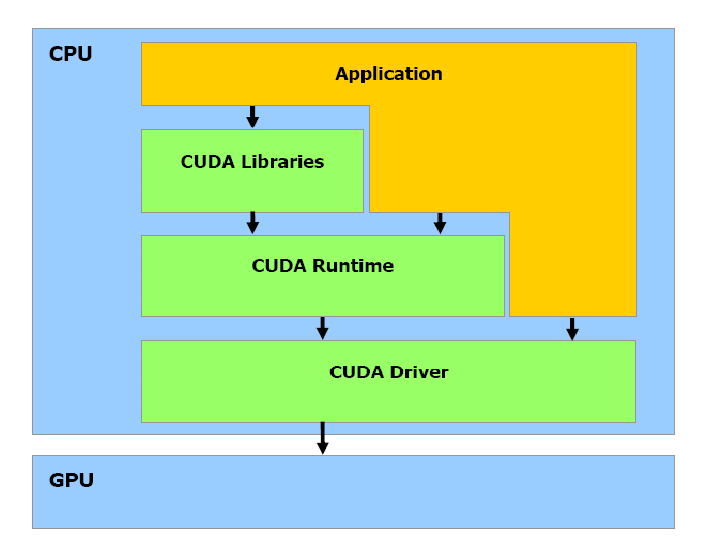
Figure 7: CUDA Software Stack
The table below shows selected components from CUDA Toolkit 13.4 GA, using NVIDIA’s versioned release notes. Components are versioned independently; this is a release snapshot, not a requirement to upgrade the lab environment.
| Component | Version |
|---|---|
| CUDA C++ Core Compute Libraries (Thrust, CUB, libcu++) | 3.4.2 |
| CUDA Runtime (cudart) | 13.4.49 |
| CUDA NVCC | 13.4.59 |
| CUDA GDB | 13.4.49 |
| CUPTI | 13.4.58 |
| CUDA Compute Sanitizer API | 13.4.57 |
| cuBLAS | 13.7.0.27 |
| cuFFT | 12.4.0.34 |
| cuRAND | 10.4.4.49 |
| cuSOLVER | 12.3.2.15 |
| cuSPARSE | 12.8.6.49 |
| Nsight Compute | 2026.3.0.13 |
| Nsight Systems | 2026.3.2.313 |
Supported host platforms vary by component; consult the release notes for the full architecture and operating-system matrix. Use the toolkit and profiler versions provided for your lab GPU or Viking allocation. Older GPUs may require older supported toolchains.
CUDA Memory Model
The CUDA memory model is organised as follows:
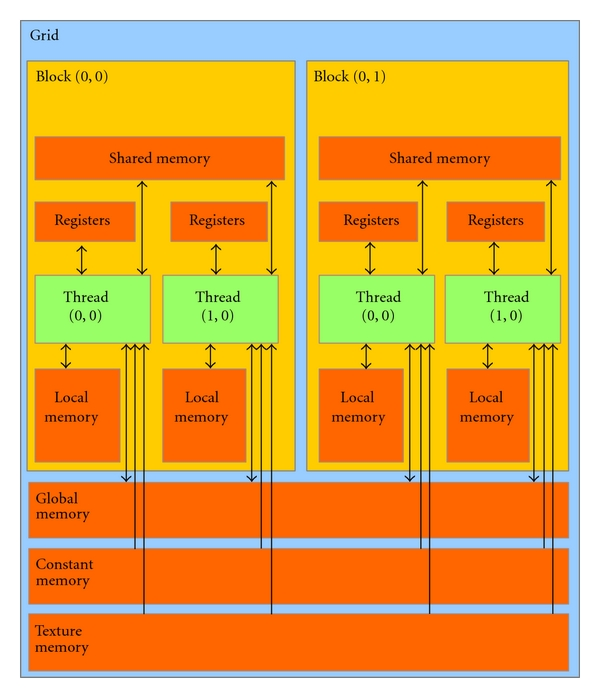
Figure 8: CUDA Memory Model
Due to the nature of data allocation in shared memory, two concurrent threads within a warp can access different words in the same bank simultaneously, causing a bank conflict that forces a GPU to serialise the accesses issued to this bank. Since serialisation in a GPU is undesirable and clock-cycle costly, this access pattern should be avoided.
The amount of memory that is available to the CUDA application is (in most cases) specific to the compute capability of the device. For each compute capability, the size restrictions of each type of memory (except global memory) is defined in the table below. The application programmer is encouraged to query the device properties in the application using the cudaGetDeviceProperties() method.
| Technical Specifications | : Compute Capability : | ||||
| ^^ | : 1.0 : | : 1.1 : | : 1.2 : | : 1.3 : | : 2.0 : |
| Number of 32-bit registers per MP | : 8 K : | : 16 K : | : 32 K : | ||
| Maximum amount of shared memory per MP | : 16 KB : | : 48 KB : | |||
| Amount of local memory per thread | : 16 KB : | : 512 KB : | |||
| Constant memory size | : 64 KB : |
The following table summarises the different memory types and the properties of those types:
| Memory | Located | Cached | Access | Scope | Lifetime |
| Register | cache | n/a | Host: None | thread | thread |
| ^^ | ^^ | ^^ | ^^ Kernel: R/W | ^^ | ^^ |
| Local | device | 1.x: No | Host: None | thread | thread |
| ^^ | ^^ | ^^ 2.x: Yes | ^^ Kernel: R/W | ^^ | ^^ |
| Shared | cache | n/a | Host: None | block | block |
| ^^ | ^^ | ^^ | ^^ Kernel: R/W | ^^ | ^^ |
| Global | device | 1.x: No | Host: R/W | application | application |
| ^^ | ^^ | ^^ 2.x: Yes | ^^ Kernel: R/W | ^^ | ^^ |
| Constant | device | Yes | Host: R/W | application | application |
| ^^ | ^^ | ^^ | ^^ Kernel: R | ^^ | ^^ |
CUDA Basic Usage
CUDA Operation Procedure
The CUDA programming model follows a SIMT (single instruction, multiple threads) approach. In CUDA, the CPU and GPU must work together in a predefined sequence. Data must be transferred from a CPU (i.e. the host) to the GPU (i.e. the device), typically over a PCIe bus, before offloading computation to the GPU; afterward, the result is transferred back to the host’s main memory. A typical sequence of operations for a CUDA C program is as follows:
- Declare and allocate the host and device memory.
- Initialise host data.
- Transfer data from the host memory to device memory.
- Load the GPU program and execute one or more kernels, with data cached on-chip for performance.
- Transfer results from the device memory to the host memory.
In the following section, we will cover how to use the CUDA toolkit and write CUDA-accelerated programs.
First CUDA Example
CUDA uses a C-like syntax and adds its own primitives and API on top of C. To understand the difference, we’ll first look at the classic “Hello, World” example written in C and in CUDA.
First, as written in C (using a function call for the printf() for simplicity later):
#include <stdio.h>

void c_hello() {
    printf("Hello, World!\n");
}

int main(int argc, char *argv[]) {
    c_hello();
    return 0;
}
… and now in CUDA:
#include <stdio.h>

__global__ void cuda_hello() {
    printf("Hello, World! From GPU!\n");
}

int main(int argc, char *argv[]) {
    cuda_hello<<<1,1>>>();
    cudaDeviceSynchronize();
    return 0;
}
A CUDA program has two parts: (1) host code on the CPU which interfaces with the GPU and (2) kernel code which runs on the GPU. In the CUDA version, the __global__ specifier indicates a function that runs on the device (GPU). Such a function can be called through host code, e.g., from the main() method in the example, and is also known as a “kernel”. The <<<...>>> specifies its execution configuration, and in CUDA terminology, this is called a “kernel launch”.
In its simplest format, this looks like:
kernel_routine<<<griddim, blockdim>>>(args);
where,
griddimis the number of instances of the kernel (the “grid” size)blockdimis the number of threads within each instanceargsis a limited number of arguments, usually mainly pointers to arrays in the GPUs memory, and some constants which get copied by-value
The more general form allows griddim and blockdim to be 2D or 3D to simplify more complex configurations.
Compiling CUDA Programs
To compile a CUDA program, the nvcc compiler should be used. Just like gcc, nvcc can take parameters to, for example, change the output file name, or to include libraries. Note that the source file extension is .cu for CUDA programs. Below is a table of input file extensions/types that nvcc accepts:
| Input File Prefix | Description |
.cu |
CUDA source file, containing host code and device functions |
.c |
C source file |
.cc, .cxx, .cpp |
C++ source file |
.ptx |
PTX intermediate assembly file (see Figure 9) |
.cubin |
CUDA device code binary file (CUBIN) for a single GPU architecture (see Figure 9) |
.fatbin |
CUDA fat binary file that may contain multiple PTX and CUBIN files (see Figure 9) |
.o, .obj |
Object file |
.a, .lib |
Library file |
.res |
Resource file |
.so |
Shared object file |
To compile the “hello, world” example, in a new terminal:
$ nvcc hello.cu -o hello
Once the compilation is finished, the program can be run with:
$ ./hello
CUDA compilation works as follows: the input program is preprocessed for device compilation and is compiled to a CUDA binary (cubin) and/or PTX intermediate code, which are placed in a fat binary. The input program is preprocessed once again for host compilation and is synthesised to embed the fat binary and transform CUDA specific C++ extensions into standard C++ constructs. Then, the C++ host compiler compiles the synthesised host code with the embedded fat binary into a host object. The exact steps that are followed to achieve this are displayed in the Figure 9:
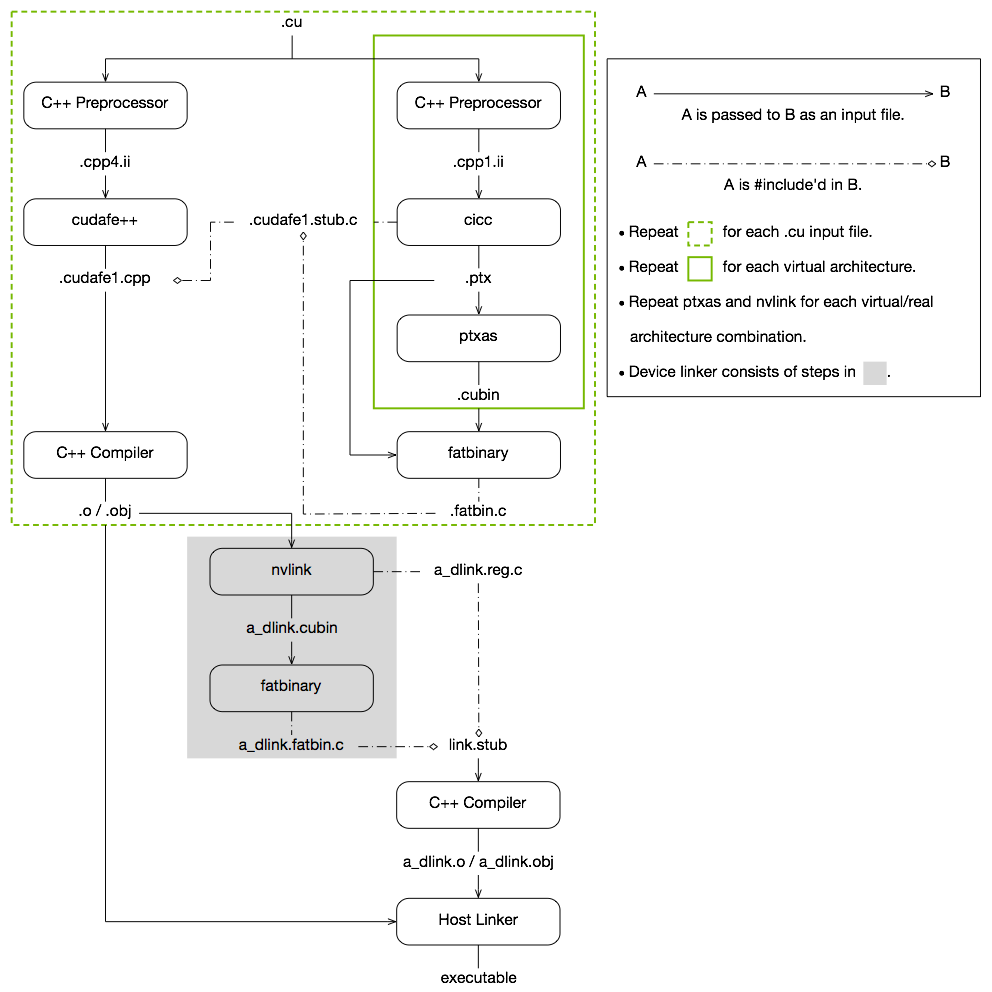
Figure 9: The CUDA compilation process – from .cu to a binary
The embedded fat binary is inspected by the CUDA runtime system whenever the device code is launched by the host program to obtain an appropriate fat binary image for the current GPU.
Vectorisation with CUDA
Vector Add example
Consider the following vec_add.c example, where two vectors of size N are added together (i.e. out[i] = a[i] + b[i]):
#define N 1024*256

void vector_add(float *out, float *a, float *b, int n) {
    for (int i = 0; i < n; i++) {
        out[i] = a[i] + b[i];
    }
}

int main(int argc, char *argv[]) {
    float *a, *b, *out;

    // Allocate memory
    a   = (float *) malloc(sizeof(float) * N);
    b   = (float *) malloc(sizeof(float) * N);
    out = (float *) malloc(sizeof(float) * N);

    // Initialize array
    for (int i = 0; i < N; i++) {
        a[i] = 1.0f;
        b[i] = 2.0f;
    }

    // Main function
    vector_add(out, a, b, N);
}
To vectorise this operation in CUDA, we first need to allocate memory on the GPU. This is because host and device memory are separate entities, and to run programs on the device, we need the memory to be allocated on the device. CUDA provides some memory management functions that are similar to C equivalents. The most important ones are:
cudaMalloc(void **devPtr, size_t size);      // equivalent to malloc()
cudaFree(void *devPtr);                      // equivalent to free()
cudaMemcpy(void *dst, const void *src,
    size_t count, enum cudaMemcpyKind kind)  // equivalent to memcpy()
For the memory copy function, depending on where the source and target data are, there are different values for the kind argument. A full list is given below:
kind |
Source and Destination |
cudaMemcpyHostToHost |
Host → Host |
cudaMemcpyHostToDevice |
Host → Device |
cudaMemcpyDeviceToHost |
Device → Host |
cudaMemcpyDeviceToDevice |
Device → Device |
cudaMemcpyDefault |
Default based unified virtual address space |
We can now write a kernel function with the decorator __global__ to indicate that this is a device program:
__global__ void vector_add(float *out, float *a, float *b, int n) {
    for (int i = 0; i < n; i++) {
        out[i] = a[i] + b[i];
    }
}
And then in the main() function, call the vector_add() kernel:
int main(int argc, char *argv[]) {
    float *a, *b, *out;
    float *d_a, *d_b, *d_out;

    // Allocate host memory for a
    a = (float *) malloc(sizeof(float) * N);
    b = (float *) malloc(sizeof(float) * N);

    ...

    // Allocate device memory for a
    cudaMalloc((void **) &d_a, sizeof(float) * N);
    cudaMalloc((void **) &d_b, sizeof(float) * N);
    cudaMalloc((void **) &d_out, sizeof(float) * N);

    // Transfer data from host to device memory
    cudaMemcpy(d_a, a, sizeof(float) * N, cudaMemcpyHostToDevice);
    cudaMemcpy(d_b, b, sizeof(float) * N, cudaMemcpyHostToDevice);

    vector_add<<<1,1>>>(d_out, d_a, d_b, N);

    ...

    // Cleanup after kernel execution
    cudaFree(d_a);
    cudaFree(d_b);
    free(a);
    free(b);
}
Note some irrelevant code is omitted, for example, the initialisation of a and b.
Profiling Performance
NVIDIA Nsight Systems (nsys) records CUDA activity so that we can compare kernel execution and memory-transfer costs. To profile our vector addition:
$ nsys profile --trace=cuda --sample=none --cpuctxsw=none --stats=true -o vec_add_profile ./vec_add
This prints summary statistics and saves vec_add_profile.nsys-rep. Look for vector_add in the kernel summary and host-to-device/device-to-host copies in the memory-operation summary. Timings depend on the GPU, problem size, and launch configuration. The options above disable CPU sampling and context-switch tracing, which are not needed for this exercise.
To inspect individual GPU operations in execution order:
$ nsys stats --report cuda_gpu_trace vec_add_profile.nsys-rep
Report names vary between Nsight Systems releases: run nsys stats --help-reports to list those installed. Older versions use gputrace for cuda_gpu_trace. Choose a new output name for each experiment. See the Nsight Systems User Guide and Unit 9 for more profiling options.
Kernel Execution Configuration
Note that so far, we have not exploited the full power of a GPU as we have only used <<<1,1>>> as the kernel execution configuration, which means we have only used one GPU thread. CUDA organises threads into a group called a thread block. Kernels can launch multiple thread blocks, organised into a grid structure. This is specified by the kernel execution configuration.
The general syntax of kernel execution configuration is <<<M, T>>>, where M is the grid number (i.e. number of thread blocks), and T is the number of parallel threads within each thread block (i.e. block size). Unlike OpenMP where the workload can be automatically assigned, CUDA does require some thought over how the workload is distributed (and thus how the data is manipulated) for each grid/thread. To do this, CUDA provides 5 built-in variables:
gridDimdenotes the dimension of the grid, andblockDimdenotes the dimension of a block; their types aredim3;blockIdxandthreadIdxidentify the block index within the grid and thread index within the block respectively, and their types areuint3;warpSizeis an integer type, and identifies the warp size in threads, and it should be 32 for all compute capabilities.
To give it a try, we can change the configuration of the vector_add from <<<1,1>>> to <<<1,256>>>, i.e., one block with 256 threads:
vector_add<<<1, 256>>>(d_out, d_a, d_b, N);
In the kernel function, we let the k-th thread handle the computation of k, k+stride, k+stride*2, etc. The stride is 256 as we set T to 256. In this case, the 0th thread handles 0, 256, 512; the 1st thread handles 1, 257, 513; the 2nd thread handles 2, 258, 514, etc.
__global__ void vector_add(float *out, float *a, float *b, int n) {
    int index = threadIdx.x;
    int stride = blockDim.x;

    for(int i = index; i < n; i += stride){
        out[i] = a[i] + b[i];
    }
}
Similarly, we can also change the grid size M. With 256 threads per thread block, we need at least N/256 thread blocks to have a total of N threads. To assign a thread to a specific element, we need to know a unique index for each thread. Such an index can be computed as follows:
int tid = blockIdx.x * blockDim.x + threadIdx.x;
Finally, we can put everything together, like so,
#include <stdio.h>
#include <stdlib.h>
#include <math.h>
#include <assert.h>
#include <cuda.h>
#include <cuda_runtime.h>

#define N 1024*256
#define MAX_ERR 1e-6

__global__ void vector_add(float *out, float *a, float *b, int n) {
    int tid = blockIdx.x * blockDim.x + threadIdx.x;

    // Handling arbitrary vector size
    if (tid < n) {
        out[tid] = a[tid] + b[tid];
    }
}

int main(int argc, char *argv[]) {
    float *a, *b, *out;
    float *d_a, *d_b, *d_out;

    // Allocate host memory
    a   = (float *) malloc(sizeof(float) * N);
    b   = (float *) malloc(sizeof(float) * N);
    out = (float *) malloc(sizeof(float) * N);

    // Initialize host arrays
    for (int i = 0; i < N; i++) {
        a[i] = 1.0f;
        b[i] = 2.0f;
    }

    // Allocate device memory
    cudaMalloc((void **) &d_a, sizeof(float) * N);
    cudaMalloc((void **) &d_b, sizeof(float) * N);
    cudaMalloc((void **) &d_out, sizeof(float) * N);

    // Transfer data from host to device memory
    cudaMemcpy(d_a, a, sizeof(float) * N, cudaMemcpyHostToDevice);
    cudaMemcpy(d_b, b, sizeof(float) * N, cudaMemcpyHostToDevice);


    // Executing kernel
    int block_size = 256;
    int grid_size = (N + block_size - 1) / block_size;
    vector_add<<<grid_size,block_size>>>(d_out, d_a, d_b, N);

    // Transfer data back to host memory
    cudaMemcpy(out, d_out, sizeof(float) * N, cudaMemcpyDeviceToHost);

    // Verification
    for (int i = 0; i < N; i++) {
        assert(fabs(out[i] - a[i] - b[i]) < MAX_ERR);
    }

    printf("PASSED\n");

    // Deallocate device memory
    cudaFree(d_a);
    cudaFree(d_b);
    cudaFree(d_out);

    // Deallocate host memory
    free(a);
    free(b);
    free(out);
}
Exercise
Can you do a performance comparison of
vec_addwith<<<1,1>>>,<<<1,256>>>and<<<1024,256>>>? How much speed-up can you get?
Kernel with 2D Indexing
The kernel configuration can be 2-dimensional (as well as 3-dimensional). To access the second dimension, use the .y attribute (and .z for indexing the third dimension).
For example,
__global__ void kernel(int *a, int dimx, int dimy) {
    int ix = blockIdx.x * blockDim.x + threadIdx.x;
    int iy = blockIdx.y * blockDim.y + threadIdx.y;
    int idx = iy * dimx + ix;
    a[idx] = a[idx] + 1;
}
and in your main:
dim3 grid, block;
block.x = 4;
block.y = 4;
grid.x = dimx / block.x;
grid.y = dimy / block.y;

kernel<<<grid, block>>>(d_a, dimx, dimy);
The features mentioned in this unit only cover the basics of CUDA. In the next unit, we will be looking at more advanced topics on CUDA programming, for example, performance considerations. We recommend you further explore the CUDA APIs and practice these in the practical sessions.
Recommended Reading
- CUDA C++ Programming Guide, NVIDIA.
- CUDA C++ Programming Guide (pdf version), NVIDIA.
- NVIDIA’s Fermi: The First Complete GPU Computing Architecture, NVIDIA.
- An Introduction to CUDA, Mike Giles, Oxford University.
- Learn CUDA - CUDA Tutorials, Tutorials Point.
- GPU programming in CUDA: How to write efficient CUDA programs