4. Programming On-core Parallelism
Overview
Now that we have covered the basics of the C programming language, and a little on scientific computing, the remaining sessions will be a little different.
The remaining 7 practicals will be far less guided, instead focusing on a few simple applications that can be optimised and parallelised for a High Performance Computing platform.
You will be provided with some sample applications along with some exercises to complete that should mean applying the techniques found in the current teaching unit (or previous).
Good luck!
Exercise 1
Your first exercise is taken from the Introduction to High Performance Computing for Scientists and Engineers text book.
Given the following code, which optimisation strategies would you suggest? Write down a transformed version of the code which you expect to give the best performance.
double mat[N][N];
double s[N][N];
int v[N];

// fill v and s

for (int j = 0; j < N; j++) {
    for (int i = 0; i < N; i++) {
        double val = fmod(v[i], 256);
        mat[i][j] = s[i][j] * (sin(val) * sin(val) - cos(val) * cos(val));
    }
}
No assumptions about the size of
Nmay be made. You may, however, assume that the code is part of a subroutine which gets called very frequently.sandvmay change between calls, and all elements ofvare positive.Note: The code here has been translated from Fortran to C (along with some associated changes). You can find an answer to this problem on page 294 of the text book.
Spheres
Attached File: spheres.c
Here is some code that creates a number of spheres (specified on the command line) and then calculates some information about the spheres, outputting a table of results to the screen at the end.
#include <stdio.h>
#include <math.h>
#include <stdlib.h>

#define MAX_RAND 10000

struct sphere_t {
    double x;
    double y;
    double z;
    double r;
};

double random_number() {
    // returns a random floating point number between 0.0 and MAX_RAND
    return fmod(rand() * ((double) rand() / RAND_MAX), MAX_RAND);
}

int main(int argc, char *argv[]) {
    // read N from the first command line argument
    int N = atoi(argv[1]);

    struct sphere_t * sphere = malloc(sizeof(struct sphere_t) * N);
    // fill with random numbers
    for (int i = 0; i < N; i++) {
        sphere[i].x = random_number();
        sphere[i].y = random_number();
        sphere[i].z = random_number();
        sphere[i].r = random_number() / 4.0;
    }

    // calculate areas
    double * area = calloc(N, sizeof(double));
    for (int i = 0; i < N; i++) {
        area[i] = 4.0 * M_PI * pow(sphere[i].r, 2.0);
    }

    // calculate volume
    double * volume = calloc(N, sizeof(double));
    for (int i = 0; i < N; i++) {
        volume[i] = (4.0 / 3.0) * M_PI * pow(sphere[i].r, 3.0);
    }

    // calculate the number of spheres each sphere intersects
    int * intersects = calloc(N, sizeof(int));
    for (int i = 0; i < N; i++) {
        for (int j = 0; j < N; j++) {
            if (i == j) continue; // same circle

            // calculate distance between two spheres
            double d = sqrt(pow(sphere[j].x - sphere[i].x, 2.0) + pow(sphere[j].y - sphere[i].y, 2.0) + pow(sphere[j].z - sphere[i].z, 2.0));
            // if the distance is less than the sum of the radii, they intersect
            if (d < (sphere[j].r + sphere[i].r)) intersects[i]++;
        }
    }

    // print out all information to the screen (consider piping this to a file)
    printf("x, y, z, r, area, volume, intersects\n");
    for (int i = 0; i < N; i++) {
        printf("%lf, %lf, %lf, %lf, %lf, %lf, %d\n", sphere[i].x, sphere[i].y, sphere[i].z, sphere[i].r, area[i], volume[i], intersects[i]);
    }
}
You can compile it with:
$ gcc -O0 spheres.c -o spheres -lm
And you can run the code (for 10000 spheres) with:
$ ./spheres 10000
Read through the code and make sure you understand what it’s doing.
For now, we’re going to disable compiler optimisations, so make sure you keep -O0 throughout the following exercises.
Exercise 2
Instrument the
spheres.ccode with appropriate timers (or counters (or both!)). You can implement the timers any way you wish, and you can choose how to display the timers results.Tip: At the moment, the spheres code outputs its information to standard out, so you might like to print your timing results to standard error (using
fprintf(stderr, "...", ...)). You can then use pipes to hide information you don’t want, e.g. (to send standard output to/dev/null, and standard error to a file)$ ./spheres 10000 1>/dev/null 2>timing_output.txt
Exercise 3
Review the simple optimisation strategies in Unit 4 and see which methods can be applied to the spheres code.
Optimise the code and review the performance improvement you can get from each optimisation method. Explore how the improvements vary with parameters (i.e. more spheres, less spheres).
Using Intel Advisor
Intel Advisor is available on the departmental machines. You can use it to perform roofline analysis of your code, or you can use it to provide advice on vectorisation.
You can start the Advisor GUI by first ‘sourcing’ the setvars script, and then launching the GUI like so:
$ source /opt/intel-advisor/setvars.sh
$ advisor-gui
You should be greeted by a screen like so:

Figure 1: Intel Advisor Opening Screen
Creating a Project
You can create a project by using the “Create Project” button, and then giving your project a name. So, for example, to create a project around the nbody code from this practical:
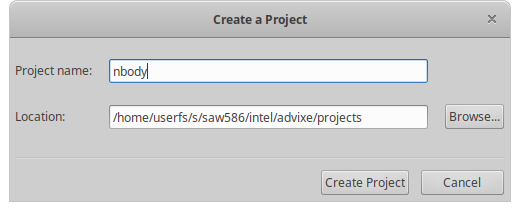
Figure 2: Creating a project in Intel Advisor
In the project properties, you should find the compiler’s binary and select that as the application.
Note: You will need to compile your application with debug symbols (i.e. -g)
You can provide some arguments to the application in the parameters field. So for the nbody code (see Bonus Exercise below), with 1000 particles for 100 time steps:
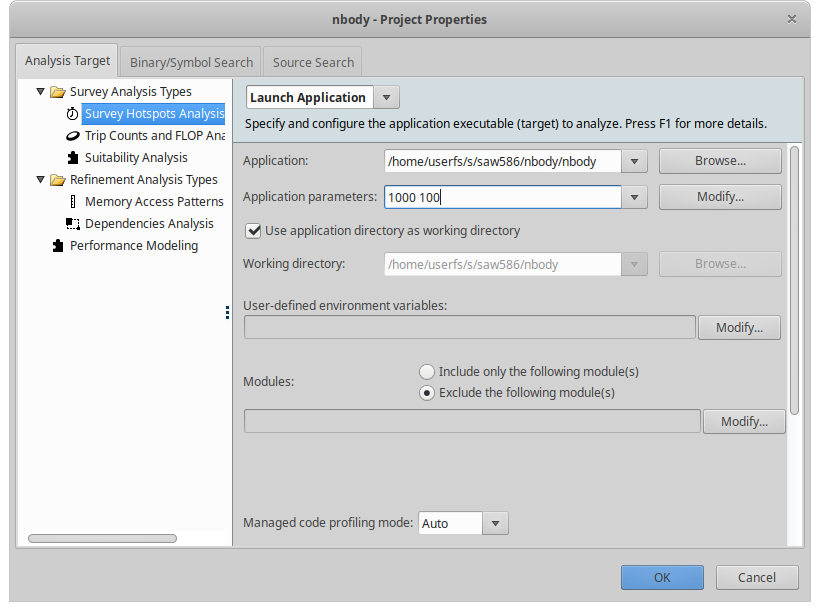
Figure 3: Providing application parameters
Perform Some Analysis
If you’d like to see vectorisation hints and code analysis, choose the Vectorization and Code Insights function.

Figure 4: Vectorization and Code Insights
From here you can run the analysis with varying levels of accuracy and see a report on the timing of various functions and loops, along with hints on where vectorisation has and hasn’t been applied, or how your code can be changed to improve performance or vectorisation.

Figure 5: Analysis workflow, choosing accuracy level
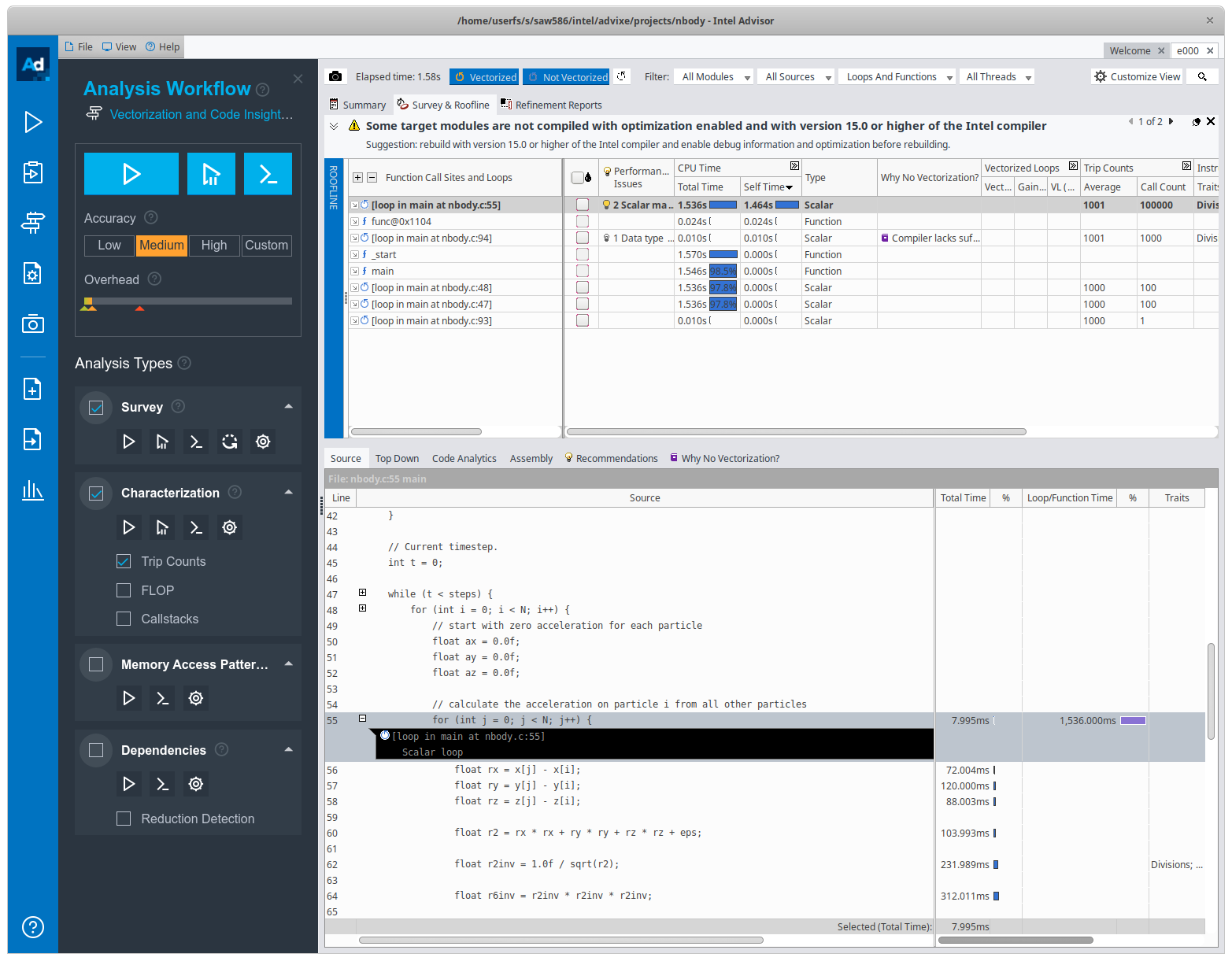
Figure 6: Code profiling information
Perform Roofline Analysis
You can also perform a Roofline Analysis by choosing the CPU / Memory Roofline Insights option above. You will need to collect Trip Counts and FLOP characterisations and it will plot the various rooflines, along with where your code sits in that space. This will aid your search for optimisations, and whether you should pursue memory optimisations or compute optimisations.
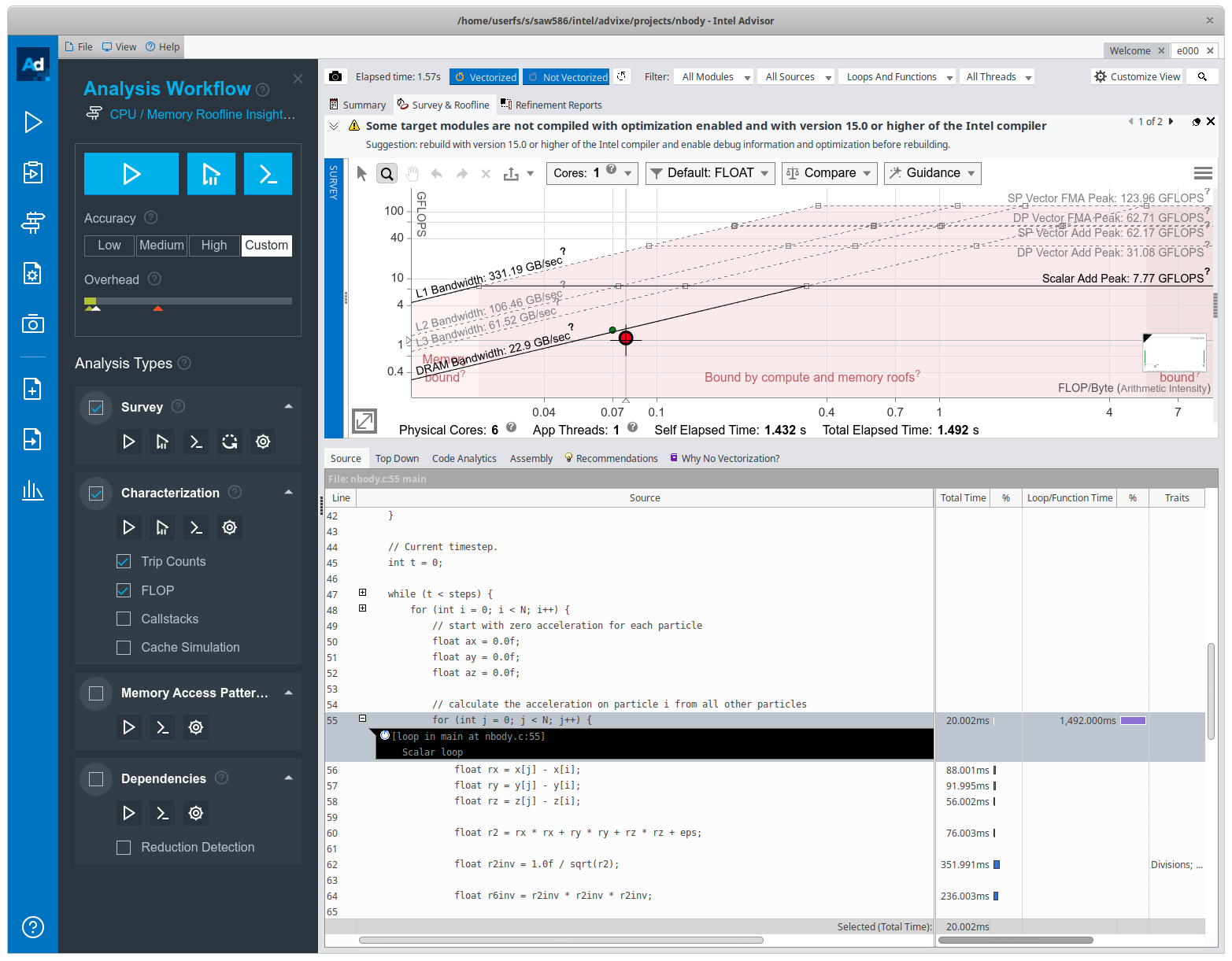
Figure 7: Performing a Roofline Analysis in Intel Advisor
Exercise 4
Use Intel Advisor to analyse the spheres code.
Analyse the original code and executable, and then analyse your optimised version of the code.
Generate a roofline plot of each. What insights can you gather from this analysis?
Exercise 5
The code for calculating the number of intersections is a good target for vectorisation.
Try rewriting the spheres application using vector intrinsics. Refer to the Intel Intrinsics Guide for help.
You will need to include the
immintrin.hheader file, and use the-mavxor-mavx2command line switch to enable the compiler to generate instructions for AVX and AVX2 instruction sets.Note: On the lab machines you can almost certainly use AVX/AVX2 intrinsics. On your own machine, you may have to check what instruction sets you have available. You can do this by reviewing the output of
/proc/cpuinfo(on Linux). e.g.$ cat /proc/cpuinfo processor : 0 vendor_id : GenuineIntel cpu family : 6 model : 158 model name : Intel(R) Core(TM) i7-8700K CPU @ 3.70GHz stepping : 10 microcode : 0xea cpu MHz : 800.689 cache size : 12288 KB physical id : 0 siblings : 12 core id : 0 cpu cores : 6 apicid : 0 initial apicid : 0 fpu : yes fpu_exception : yes cpuid level : 22 wp : yes flags : fpu vme de pse tsc msr pae mce cx8 apic sep mtrr pge mca cmov pat pse36 clflush dts acpi mmx fxsr sse sse2 ss ht tm pbe syscall nx pdpe1gb rdtscp lm constant_tsc art arch_perfmon pebs bts rep_good nopl xtopology nonstop_tsc cpuid aperfmperf pni pclmulqdq dtes64 monitor ds_cpl vmx smx est tm2 ssse3 sdbg fma cx16 xtpr pdcm pcid sse4_1 sse4_2 x2apic movbe popcnt tsc_deadline_timer aes xsave avx f16c rdrand lahf_lm abm 3dnowprefetch cpuid_fault invpcid_single pti ssbd ibrs ibpb stibp tpr_shadow vnmi flexpriority ept vpid ept_ad fsgsbase tsc_adjust bmi1 hle avx2 smep bmi2 erms invpcid rtm mpx rdseed adx smap clflushopt intel_pt xsaveopt xsavec xgetbv1 xsaves dtherm ida arat pln pts hwp hwp_notify hwp_act_window hwp_epp md_clear flush_l1d bugs : cpu_meltdown spectre_v1 spectre_v2 spec_store_bypass l1tf mds swapgs taa itlb_multihit srbds bogomips : 7399.70 clflush size : 64 cache_alignment : 64 address sizes : 39 bits physical, 48 bits virtual power management : ...Note: “
avx” and “avx2” are both listed under the “flags” category. Alternatively, you could Google the CPU model.
Exercise 6
Try compiling the original application and your optimised code with
-O3. Which is faster and why? Review the optimisation reports.
Bonus Exercise
Attached File:
nbody.cHere is a simple n-body code. In the code there are a series of particles in 3D space, where each particle has position in space (x, y, z), a velocity vector (vx, vy, vz), and a mass (m). The code calculates the force felt on each particle by all other particles (as an acceleration) and then updates their velocity. The code then updates each particles position based on the velocity and the time step size.
At the end of the computation, the code calculates a simple checksum that can be used to ensure our simulation is correct.
#include <stdio.h>
#include <stdlib.h>
#include <math.h>
#include <immintrin.h>

#include <sys/time.h>
#include <sys/times.h>
#include <sys/resource.h>

// Simulation parameters.
float eps = 0.00125f;
float dmp = 0.995f;
float dt = 0.001f;

/**
 * Main function.
 */

int main(int argc, char *argv[]) {
    int N = atoi(argv[1]);
    int steps = atoi(argv[2]);

    // Allocate arrays, aligned to 16 bytes.
    float *x = (float *) malloc(N * sizeof(float));
    float *y = (float *) malloc(N * sizeof(float));
    float *z = (float *) malloc(N * sizeof(float));
    float *vx = (float *) malloc(N * sizeof(float));
    float *vy = (float *) malloc(N * sizeof(float));
    float *vz = (float *) malloc(N * sizeof(float));
    float *m = (float *) malloc(N * sizeof(float));

    // Initialise array contents.
    srand(42);
    for (int i = 0; i < N; i++) {
        x[i] = ((rand() / (float)RAND_MAX) * 2 - 1);
        y[i] = ((rand() / (float)RAND_MAX) * 2 - 1);
        z[i] = ((rand() / (float)RAND_MAX) * 2 - 1);
        vx[i] = ((rand() / (float)RAND_MAX) * 2 - 1);
        vy[i] = ((rand() / (float)RAND_MAX) * 2 - 1);
        vz[i] = ((rand() / (float)RAND_MAX) * 2 - 1);
        m[i] = (rand() / (float)RAND_MAX);
    }

    // Current timestep.
    int t = 0;

    while (t < steps) {
        for (int i = 0; i < N; i++) {
            // start with zero acceleration for each particle
            float ax = 0.0f;
            float ay = 0.0f;
            float az = 0.0f;

            // calculate the acceleration on particle i from all other particles
            for (int j = 0; j < N; j++) {
                float rx = x[j] - x[i];
                float ry = y[j] - y[i];
                float rz = z[j] - z[i];

                float r2 = rx * rx + ry * ry + rz * rz + eps;

                float r2inv = 1.0f / sqrt(r2);

                float r6inv = r2inv * r2inv * r2inv;

                float s = m[j] * r6inv;

                ax += s * rx;
                ay += s * ry;
                az += s * rz;
            }

            // update the velocity based on calculated acceperation
            vx[i] += dmp * (dt * ax);
            vy[i] += dmp * (dt * ay);
            vz[i] += dmp * (dt * az);
        }

        // update the position of each particle
        // reflect boundary particles
        for (int i = 0; i < N; i++) {
            x[i] += dt * vx[i];
            y[i] += dt * vy[i];
            z[i] += dt * vz[i];
            if (x[i] >= 1.0f || x[i] <= -1.0f) vx[i] *= -1.0f;
            if (y[i] >= 1.0f || y[i] <= -1.0f) vy[i] *= -1.0f;
            if (z[i] >= 1.0f || z[i] <= -1.0f) vz[i] *= -1.0f;
        }
        t++;
    }

    float phi = 0.0f;
    for (int i = 0; i < N; i++) {
        for (int j = 0; j < N; j++) {
            float rx = x[j] - x[i];
            float ry = y[j] - y[i];
            float rz = z[j] - z[i];
            float r2 = rx*rx + ry*ry + rz*rz + eps;
            float r2inv = 1.0 / sqrt(r2);
            float r6inv = r2inv * r2inv * r2inv;
            phi += m[j] * r6inv;
        }
    }

    printf(" Answer = %f\n", phi);

    // Tidy up.
    free(x);
    free(y);
    free(z);
    free(vx);
    free(vy);
    free(vz);
    free(m);
}
The program takes two input parameters from the command line. The number of particles,
N, and the number of time steps,steps. You can run your compiled code like so:$ ./nbody 1000 100Add timers to the application and then optimise it as best as you can. Bonus marks if you are able to make use of vector intrinsics in the main loop body.