9. Advanced CUDA Programming
Overview
In this lab, we will explore advanced CUDA topics, including shared memory and asynchronous execution. Additionally, we will delve into profiling and fine-tuning the performance of parallel GPU programs. If you have not completed the previous lab, it is recommended to do so first, as the concepts covered here are more advanced.
Good luck, and enjoy the lab!
Matrix Multiplication
Consider a matrix-matrix multiplication problem, i.e., $C = A \times B$. To multiply an $m \times n$ matrix ($A$) by an $n \times p$ matrix ($B$), the $n$s of the two matrices must be the same, and the result is an $m \times p$ matrix ($C$).
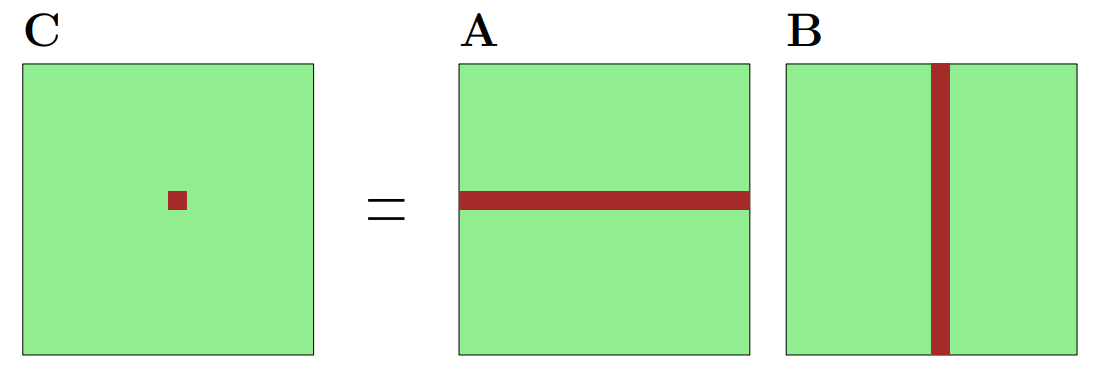
Figure 1: Matrix Multiplication
The matrix multiplication can be calculated with the following equation:
\[C_{i,j} = \sum_k A_{i,k}B_{k,j}\]Using this equation as a foundation, we can begin by implementing a simple serial version of matrix multiplication:
void matrix_multiplication(double **A, double **B, double **C, int M, int N, int P) {
    // initialize C with zeros
    for (int i = 0; i < M; i++) {
        for (int j = 0; j < N; j++) {
            C[i][j] = 0;
        }
    }

    for (int i = 0; i < M; i++) {
  	    for (int j = 0; j < N; j++) {
  		      for (int k = 0; k < P; k++) {
  			        C[i][j] += A[i][k]*B[k][j];
            }
        }
    }
}
To help you start, you can find an example C code in the following .zip file. In this example, the program reads the data of Matrix A and Matrix B from two files, then multiplies them.
Attached File: matrix.zip
Note
To profile your CUDA code, you will need a much larger matrix, say 1024 x 1024 or 2048 x 2048 (otherwise the execution time of the kernel would be negligible compared to memory copy, etc). You can either generate your own
matrix.datfile following the format, or use the random matrix generator provided in the code, which randomly assigns a value between (0,1) to each element in the matrix.
Exercise 1
Rewrite the above code in CUDA with 1D thread blocks. Replace the function with a kernel and write a
main()function to launch that kernel function. At this first stage, make it as simple as possible. Later on, this will be used as the baseline and we will gradually improve it.Note that you need to design a verification process to validate the results are correct.
Exercise 2
Time the kernel you have written in Exercise 1 using
cudaEventElapsedTime(). Then profile your code with Nsight Systems (nsys) using the commands below. Compare the CUDA event measurement with the GPU kernel duration, rather than total application or CUDA API time. Measure the same region and allow for profiling overhead and run-to-run variation.
Profiling with NVIDIA Nsight Systems
Collect a profile from the command line, replacing ./matrixMul with your executable and appending any input-file arguments:
$ nsys profile --trace=cuda --sample=none --cpuctxsw=none --stats=true -o matrix_profile ./matrixMul
Use a distinct output name for each implementation. On Viking, run this command within your GPU job on an allocated GPU compute node.
Open the resulting matrix_profile.nsys-rep file in the Nsight Systems GUI (nsys-ui). If you collected it on Viking, download the report to your local machine first. Use a GUI version compatible with the version that collected the report. The Nsight Systems User Guide describes the timeline and report views.
Inspect the CUDA API and GPU timeline rows to answer:
- Which kernel takes the most GPU time?
- How much time is spent transferring inputs and results?
- Are there idle gaps between GPU operations?
- Do asynchronous copies and kernels overlap when you expect them to?
You can also inspect reports without a graphical interface:
$ nsys stats --report cuda_gpu_kern_sum,cuda_gpu_mem_time_sum,cuda_api_sum matrix_profile.nsys-rep
$ nsys stats --report cuda_gpu_trace matrix_profile.nsys-rep
Run nsys stats --help-reports if a report name is unavailable. Older releases use gpukernsum, gpumemtimesum, cudaapisum, and gputrace, respectively. For detailed kernel hardware metrics, use Nsight Compute on supported GPUs.
Exercise 3
Rewrite your code with 2D kernels. After you have done that, use automatic block size tuning (
cudaOccupancyMaxPotentialBlockSize(...)). Note that this only gives a block size and you have to work out your own 2D/3D block dimension to match your problem size.Plot the performance against different parameters and see how automatic tuning performs. You can first collect the performance data, then use MATLAB, Python with matplotlib, or Excel to plot the results.
Occupancy is an important concept to achieve performant CUDA programs, you can refer to the CUDA Occupancy Calculator as it would give you some insight into what to consider in terms of performance tuning.
Exercise 4
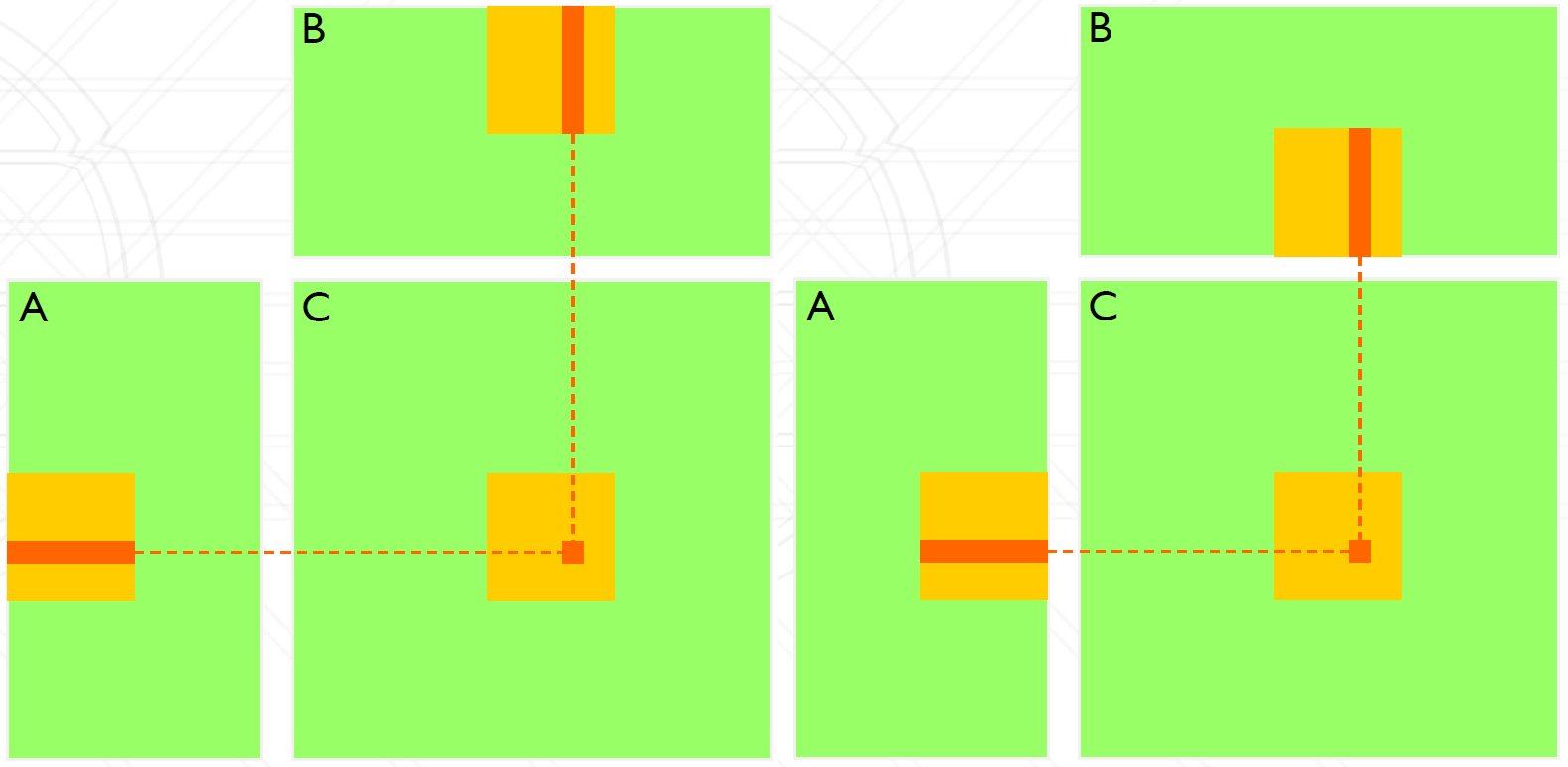
The current kernel function is inefficient because each element of Matrix A is read N times (once for each column of B), and each element of Matrix B is read M times (once for each row of A). To enhance its efficiency, try optimising your kernel function by using Shared Memory.
Tips:
- Decompose the problem: each block computes a submatrix (illustrated as below).
- Make sure that data is only loaded once from the main memory and then stored in shared memory.
- Use
__syncthreads()where appropriate to avoid race condition.
Figure 2: Sub-Matrix Multiplication
Exercise 5
Profile different versions of your implementations. Plot the results and make a comparison of their performance. For example, you may want to compare the following different versions:
- Simple CPU
- Simple GPU
- GPU with optimised block size
- GPU with shared memory
Further Reading
- CUDA C++ Best Practices Guide, NVIDIA.
- Nsight Systems User Guide, NVIDIA.